Tuesday, October 25, 2011

Formatting Numbers On DVT Pie.

Using numberFormatString property of dvt:pieGraph->dvt:sliceLabel->dvt:numberFormat tag, you can change the format of the number rendering on Pie graph from :


to


Here, I set the numberFormatSting to FM999,999,999,999,999 to get the desired output, as shown below:


Since numberFormat tag is deprecated now, the same view can be achieved by using af:converNumber tag instead of dvt:numberFormat tag, and by setting scaling to none, and AutoPrecision to off on dvt:sliceLabel tag.

Thursday, October 13, 2011

Case-Insensitive Filtering for ADF Tables.

The FilterFeatures property of af:column component can have 2 values: "caseSensitive" or "caseInsensitive". This property is used to configure if a filter needs to be case-sensitive or case-insensitive. It was not working earlier but now it works fine.

Refer to the following forum post for details:

https://forums.oracle.com/forums/thread.jspa?messageID=3697884&#3697884

Monday, October 10, 2011

Glasspane Rendering JavaScript's Issue on IE 7.

If you refer to following link:

http://www.oracle.com/technetwork/developer-tools/jdev/1-2011-javascript-302460.pdf

You will find that the JavaScript listed to render glasspane is as follows:

<af:resource type="javascript">
function enforcePreventUserInput(evt){
        var popup = AdfPage.PAGE.findComponentByAbsoluteId('p1');
        if (popup != null){
                AdfPage.PAGE.addBusyStateListener(popup,handleBusyState);
                evt.preventUserInput();
        }
}
//JavaScript callback handler
function handleBusyState(evt){
        var popup = AdfPage.PAGE.findComponentByAbsoluteId('p1');
        if(popup!=null){
                if (evt.isBusy()){
                        popup.show();
                }
                else{
                        popup.hide();
                        //remove busy state listener (important !!!)
                        AdfPage.PAGE.removeBusyStateListener(popup, handleBusyState);
                }
        }
}
</af:resource>

This JavaScript does not work well when called from a column of a table (for example, if you are calling a PL/SQL function/procedure) on IE 7. If you first select a row in a table, and then click the link to call a PL/SQL function/procedure to render glasspane, then it works fine but if you straight away calls the PL/SQL function/procedure the glasspane does not render at all.

However, after working with Oracle Support, figured out that the fix of this problem is pretty simple. We need to modify function handleBusyState() as follows:

function handleBusyState(evt) {
        var popup = AdfPage.PAGE.findComponentByAbsoluteId('p1');
        if (popup != null) {
                if (evt.isBusy()) {
                        popup.show();
                }
                else if (popup.isPopupVisible()) {
                        popup.hide();
                        AdfPage.PAGE.removeBusyStateListener(popup, handleBusyState);
                }
        }
}

The reason for this is explained in the SR as follows:

"
In this usecase on the action event of a command link you have a client listener that registers a busy state listener. The callback for the busy state listener shows the popup when the busy state is true or hides the popup and unregisters the busy state listener. Registered busy state listeners are invoked before and after every PPR regardless of the events sent to the server. In this scenario, when you register the busy state listener from the action handler, there is already a table selection event in flight. The first invocation of this listener reflects a false busy state. This is correct as it marks the completion of the table row selection event. The logic in the busy state callback hides and unregisters the busy state handler before the action event is even sent to the server. This is why the popup is never shown. The key here is that the busy state listener is not specifically targeted at a component. It reflects any component event sent to the server. The first parameter for the "addBusyStateListener" and "removeBusyStateListener" is just the context that the callback should be invoked on. A simple fix to this issue is to just check to see if the popup is visible before hiding and unregistering the listener.
"

Informed Frank about this fix to update the code corner PDF, but other PDFs are not in synch.
So, pasting this in here for future reference.

For details, refer:

Forum Post: https://forums.oracle.com/forums/thread.jspa?threadID=2246139&start=0&tstart=0
Service Request: SR 3-3985745581: Glasspane rendering in ADF
Bug 12834664: SHOW GLASSPANE WITH JAVASCRIPT CODE DOESN'T WORK FOR IE


Friday, September 30, 2011

Fixing: oracle.jbo.RowInconsistentException: JBO-25014: Another user has changed the row with primary key oracle.jbo.Key

To fix this issue, we need to make sure that:

  • Change indicator and history columns are mapped correctly. Change indicator column can be a version number column or last update date column.
  • All those columns that are getting updated by a database trigger or a PL/SQL call, are enabled for 'Refersh On Insert' (for insert case ) or 'Refresh On Update' (for update case) or both.
Remember that LastUpdateDate column can also work and Change Indicator.


References:
https://forums.oracle.com/forums/thread.jspa?threadID=214411
http://radio-weblogs.com/0118231/stories/2004/03/24/whyDoIGetOraclejborowinconsistentexception.html

Wednesday, September 28, 2011

ADF Library Feature & Security

JDev Version 11.1.2.

As we can break big application into small work-spaces and projects, I was wondering how we can implement security in that case. For example, consider and project, say Producer, which has all the task flows required by project, say Consumer. If Consumer project has enabled ADF Security, and the requirement is to make sure that a column of a table rendered in the Producer's task flow should be read only based on the roles defined in the jazn of Consumer project. In this case, how should we implement security.
This blog is about that.

For this, I am using the same project as I used for Effective Dates entities as Producer (to save time), as shown below:


The components relevant for this blog are highlighted above.
The FirstTaskFlow has only one view activity, as shown below:


And that view activity contains just one table created from DatedVO->DatedEO, as shown below:


I created 'ADF Library' deployment profile for View Controller project and deployed the project so that consumer applications can create a File System connection to use the task flow available in the ViewController project. Since the ViewController project is dependent on Model project as well, so the deployed jar automatically contains the BC4J components as well.

Then created a separate workspace, JarConsumerApp, as consumer application which will use the FirstTaskFlow of the producer application. Created a new File System Connection to point to the location of ViewController jar. Then later on added that ViewController jar to ConsumerViewController project as shown below:


As soon as we add the library, the AM entry gets visible in the Data Control section, and in the Project Properties->Libraries and Classpath section, the jar's entry gets added in ADF Libray section, as shown below:


Now, to add FirstTaskFlow to First.jspx, you first need to see that task flow in the Application Navigator. For this, select 'Show Libraries' as shown below:


Then, expand ADF Library->WEB-INF and drop the task flow to First.jspx page as region, as shown below:


After running, the First.jspx looks like as shown below:


It has only 1 row, and that is editable.
Now, I want to try two things:

1. The SysEffectiveDate column should be read-only on the UI for Non-Admin users.

For this, we need to enable ADF Security and do some setup on Consumer project only, ie. JarConsumerApp. After running the ADF Security wizard, I did the following:
  1. Added two new roles: Admin & NonAdmin.
  2. Created to new users: Admin & NonAdmin. Assigned Admin user to Admin role. Similarly assigned NonAdmin user to NonAdmin role, as shown below:


Then, in the Resource Grants section, select 'Resource Type' as Task Flow, and check the checkbox for 'Show task flows imported from ADF libraries' option.
Now, assign the view action on FirstTaskFlow to both Admin and NonAdmin roles, as shown below:


Similarly, do the same for First.jspx page as well, as shown below:


Now, to make SysEffectiveDate read-only, open FirstView.jspx of Producer project, and modify the input text field as shown below:


Now, redeploy the project, and run First.jspx again, this time logging in as NonAdmin user. The following screen appears:


As you can see, the SysEffectiveDate screen appears read-only, which means that security context of the producer project was able to figure out the roles defined in the consumer project.
Try logging in as Admin user, and then the following screen appears:


So, the EL expression is working fine.


2. Only Admin should be able to read DatedEO.

For this, we need to define at entity level that read operation is secured, as shown below:


Then, we need to modify jazn to tell which role can read DatedEO data, in our case its Admin, as shown below:


Now, run First.jspx again using NonAdmin user, the following screen comes up:


However, if logged in as Admin user, the following screen comes up:


As only Admin role is configured to perform 'read' action, on then data is displayed else not.
That's it.

Sunday, September 18, 2011

Understanding Effective Dated Entities Behavior - Difference Between Dated and Effective Dated Entity Types

JDev Version: 11.1.2.

The Dev Guide says that:  "The primary difference between the effective dated entity type and the dated entity type is that the dated entity does not cause row splits during update and delete."

It says primary difference, but does not explain exactly what other differences are there.
Posted the question of forum post as well, but nothing is available:

https://forums.oracle.com/forums/message.jspa?messageID=9860255#9860255

I tried to compare the behavior of Dated Entities with Effective Dated Entities, and this is what I found out:
(For the setup, and project details, please refer to the earlier blog: 'Understanding Effective Dated Entities Behavior - Creation/Update/Delete').

For Create Operation

When I created a row for DatedVO (Dated Entity) with EffectiveDate as 2001-09-09, after commit, the following data was visible in the database:

IDTEXTSTART_DATEEND_DATESEQUENCESEQUENCE_FLAG
1First09-SEP-011Y

EndDate is not populated, but StartDate is populated with the Effective Date.
However, other attributes are populated like Sequence and Sequence Flag. Not sure why the behavior is like that.

When I created a row for MultiChangesSingleDayVO (Effective Dated Entity) with EffectiveDate as 2001-09-09, after commit, the following data was visible in the database:

IDTEXTSTART_DATEEND_DATESEQUENCESEQUENCE_FLAG
1First09-SEP-0131-DEC-121Y

All the Effected Dated attributes are populated.
So this is one difference.

For Update Operation

As discussed in the earlier blogs, there are multiple flags available in the oracle.jbo.Row interface for row update behavior. Let's compare the behavior of Dated Entity with Effective Dated entity for the following flag:

Row.EFFDT_UPDATE_MODE: When an effective dated row is updated in "update" mode, the modified row is end dated on the effective date and a new row is created with the changed values.

Used the following method to update the DatedVO row:

    public void updateDatedVODatedVORow( String text, Date startDate, Date effectiveDate, int mode){
       
        if (effectiveDate != null) {
            ApplicationModuleImpl rootAM = this.getRootApplicationModule();
            rootAM.setProperty(EFF_DT_PROPERTY_STR, effectiveDate);
        }
                ViewObjectImpl vo = this.getDatedVO1();
        Row row = null;
        row = (vo.findByKey(new Key(new Object[]{ 1, null , null, startDate}), 1))[0];
        if(mode==1)
                row.setEffectiveDateMode(Row.EFFDT_UPDATE_MODE     );
        else if(mode==2)
            row.setEffectiveDateMode(Row.EFFDT_UPDATE_CHANGE_INSERT_MODE       );
        else if(mode==3)
            row.setEffectiveDateMode(Row.EFFDT_UPDATE_CORRECTION        );
        else if(mode==4)
            row.setEffectiveDateMode(Row.EFFDT_UPDATE_NEW_EARLIEST_CHANGE_MODE        );       
        else if(mode==5){
            row.setEffectiveDateMode(Row.EFFDT_UPDATE_OVERRIDE_MODE         ); 
        }
        else if(mode==6)
            row.setEffectiveDateMode(Row.EFFDT_NONE_MODE         ); 
        
        row.setAttribute("Text", text);
    
        this.getDBTransaction().commit();
    }

For DatedVO, consider the following row in the table:
Before Method Call:

IDTEXTSTART_DATEEND_DATESEQUENCESEQUENCE_FLAG
1First01-JAN-111Y

Parameter Passed:

text = MODE_1
effectiveDate = 2012-01-01(YYYY-MM-DD)
mode = 1

After Update:


IDTEXTSTART_DATEEND_DATESEQUENCESEQUENCE_FLAG
1MODE_101-JAN-111Y

As we can see, only text attribute is updated, everything else is unchanged.
So, seems like after row creation, framework logic does not update the effective dated attributes for Dated entities.
In the effective dated entities, this operation causes a new row to be inserted.

So, only this difference is documented in the Dev Guide, but other small differences are documented. Not sure why.

Understanding Effective Dated Entities Behavior - Delete

JDev Version: 11.1.2.

In this blog, I have documented the results of the tests I did for Effective Dated Entities delete behavior. For the setup, and project details, please refer to the earlier blog: 'Understanding Effective Dated Entities Behavior - Creation/Update'.

The following modes in the oracle.jbo.Row interface are available to delete Effective Dated rows:

  • Row.EFFDT_DELETE_MODE: When an effective dated row is deleted in "delete" mode, the end date of the row is set to the row's effective date and all the future rows for the same key values are deleted.
  • Row.EFFDT_DELETE_FUTURE_CHANGE_MODE: When an effective dated row is deleted in "delete future change" mode, the end date of the row is set to the end of time and all the future rows for the same key values are deleted.
  • Row.EFFDT_DELETE_NEXT_CHANGE_MODE: When an effective dated row is deleted in "delete next change" mode, the end date of the row is set to the end date of adjoining row and the adjoining row is deleted.
  • Row.EFFDT_DELETE_ZAP_MODE: When an effective dated row is deleted in "zap" mode, all the effective dated rows with the same key values are deleted.
  • Row.EFFDT_DELETE_THIS_CHANGE_MODE: When an effective dated row is deleted in "delete this change" mode, the current row is removed.
I am using the following method to delete the rows of MultiChangesSingleDayVO:

    public void deleteMultiChangesSingleDayEffDatedVORow( Date effectiveDate, int mode){
       
        if (effectiveDate != null) {
            ApplicationModuleImpl rootAM = this.getRootApplicationModule();
            rootAM.setProperty(EFF_DT_PROPERTY_STR, effectiveDate);
        }

        ViewObjectImpl vo = this.getMultiChangesSingeDayVO1();
        Row row = null;
        row = (vo.findByKey(new Key(new Object[]{ 1, null, null, "Y"}), 1))[0];
        if(mode==1)
            row.seteffectiveDateMode(Row.EFFDT_DELETE_MODE      );
        else if(mode==2)
            row.seteffectiveDateMode(Row.EFFDT_DELETE_FUTURE_CHANGE_MODE        );
        else if(mode==3)
            row.seteffectiveDateMode(Row.EFFDT_DELETE_NEXT_CHANGE_MODE        );
        else if(mode==4)
            row.seteffectiveDateMode(Row.EFFDT_DELETE_ZAP_MODE          );   
        else if(mode==5)
            row.seteffectiveDateMode(Row.EFFDT_DELETE_THIS_CHANGE_MODE          );          

    row.remove();

        this.getDBTransaction().commit();
    }

As you can see, I am using the following mode value to identify which mode to use:

1 = Row.EFFDT_DELETE_MODE
2 = Row.EFFDT_DELETE_FUTURE_CHANGE_MODE
3 = Row.EFFDT_DELETE_NEXT_CHANGE_MODE 
4 = Row.EFFDT_DELETE_ZAP_MODE         
5 = Row.EFFDT_DELETE_THIS_CHANGE_MODE 

Testing Effective Dated Table Delete:

Documenting some of results I got when I tested the Effective Dated entities delete using all the above flags:

Here it the initial table content used for all the delete test cases:

IDTEXTSTART_DATEEND_DATESEQUENCESEQUENCE_FLAG
1First01-JAN-0131-DEC-041Y
1Second01-JAN-0531-DEC-081Y
1Third01-JAN-0931-DEC-121Y

Test Cases on the above data:


1.


Parameter Passed:
       
effectiveDate = 2006-01-01       
mode = 1       

Output: Success

Table Content After Method Call:

IDTEXTSTART_DATEEND_DATESEQUENCESEQUENCE_FLAG
1First01-JAN-0131-DEC-041Y
1Second01-JAN-0501-JAN-061Y

Recalling the definition of Row.EFFDT_DELETE_MODE: When an effective dated row is deleted in "delete" mode, the end date of the row is set to the row's effective date and all the future rows for the same key values are deleted.
Perfect.

2.

Parameter Passed:
       
effectiveDate = 2006-01-01       
mode = 2       


Output: Success

Table Content After Method Call:

IDTEXTSTART_DATEEND_DATESEQUENCESEQUENCE_FLAG
1First01-JAN-0131-DEC-041Y
1Second01-JAN-0531-DEC-121Y

Recalling the definition of Row.EFFDT_DELETE_FUTURE_CHANGE_MODE: When an effective dated row is deleted in "delete future change" mode, the end date of the row is set to the end of time and all the future rows for the same key values are deleted.
Perfect.

3.

Parameter Passed:   
       
effectiveDate = 2002-01-01       
mode = 3       

Output: Success

Table Content After Method Call:

IDTEXTSTART_DATEEND_DATESEQUENCESEQUENCE_FLAG
1First01-JAN-0131-DEC-081Y
1Third01-JAN-0931-DEC-121Y

Recalling the definition of Row.EFFDT_DELETE_NEXT_CHANGE_MODE: When an effective dated row is deleted in "delete next change" mode, the end date of the row is set to the end date of adjoining row and the adjoining row is deleted.
Perfect.

4.

Parameter Passed:
       
effectiveDate = 2006-01-01
mode = 4

Output: Success

Table Content After Method Call:

IDTEXTSTART_DATEEND_DATESEQUENCESEQUENCE_FLAG

No records.

Recalling the definition of Row.EFFDT_DELETE_ZAP_MODE: When an effective dated row is deleted in "zap" mode, all the effective dated rows with the same key values are deleted.
Perfect.

5.

Parameter Passed:
       
effectiveDate = 2006-01-01
mode = 5

Output: Success

Table Content After Method Call:

IDTEXTSTART_DATEEND_DATESEQUENCESEQUENCE_FLAG
1First01-JAN-0131-DEC-081Y
1Third01-JAN-0931-DEC-121Y

Recalling the definition of Row.EFFDT_DELETE_THIS_CHANGE_MODE: When an effective dated row is deleted in "delete this change" mode, the current row is removed.
Perfect again.

So, I found understanding delete test cases easier than understanding the update test cases, could be because I found the documentation of delete test cases clearer than update scenarios.

Saturday, September 17, 2011

Understanding Effective Dated Entities Behavior - Update

JDev Version: 11.1.2.

In this blog, I have documented the results of the tests I did for Effective Dated Entities update behavior. For the setup, and project details, please refer to the earlier blog: 'Understanding Effective Dated Entities Behavior - Creation'.

The following modes in the oracle.jbo.Row interface are available to update Effective Dated rows:

  • Row.EFFDT_UPDATE_MODE: When an effective dated row is updated in "update" mode, the modified row is end dated on the effective date and a new row is created with the changed values.
  • Row.EFFDT_UPDATE_CHANGE_INSERT_MODE: When an effective dated row is updated in "change insert" mode, the modified row is end dated on the effective date and a new row is inserted that fits between the effective date and the start date of the next row in the effective date time line.
  • Row.EFFDT_UPDATE_CORRECTION: When an effective dated row is updated in "correction" mode, the effective start date and effective end date is left unchanged.
  • Row.EFFDT_UPDATE_NEW_EARLIEST_CHANGE_MODE: Updating in "new earliest change" mode is supported only in Multiple Changes Per Day.
  • Row.EFFDT_UPDATE_OVERRIDE_MODE: When an effective dated row is updated in "override" mode, the modified row is end dated on the effective date and the start date of the next row in the effective date time line is set to effective date + 1 day.   
  • Row.EFFDT_NONE_MODE: Default state of the effective date mode on the row.

I am using the following method to update the rows of MultiChangesSingleDayVO:

    public void updateMultiChangesSingleDayEffDatedVORow( String text, Date startDate, Date endDate, Date effectiveDate, int mode){
      
        if (effectiveDate != null) {
            ApplicationModuleImpl rootAM = this.getRootApplicationModule();
            rootAM.setProperty(EFF_DT_PROPERTY_STR, effectiveDate);
        }


        ViewObjectImpl vo = this.getMultiChangesSingeDayVO1();
        Row row = null;
        row = (vo.findByKey(new Key(new Object[]{ 1, null, null, "Y"}), 1))[0];
        if(mode==1)
            row.setEffectiveDateMode(Row.EFFDT_UPDATE_MODE     );
        else if(mode==2)
            row.setEffectiveDateMode(Row.EFFDT_UPDATE_CHANGE_INSERT_MODE       );
        else if(mode==3)
            row.setEffectiveDateMode(Row.EFFDT_UPDATE_CORRECTION        );
        else if(mode==4)
            row.setEffectiveDateMode(Row.EFFDT_UPDATE_NEW_EARLIEST_CHANGE_MODE        );      
        else if(mode==5){
            row.setEffectiveDateMode(Row.EFFDT_UPDATE_OVERRIDE_MODE         );
        }
        else if(mode==6)
            row.setEffectiveDateMode(Row.EFFDT_NONE_MODE         );
       
        row.setAttribute("Text", text);
        if(startDate!=null)
            row.setAttribute("StartDate", startDate);
        if(endDate!=null)
            row.setAttribute("EndDate", endDate);
   
        this.getDBTransaction().commit();
    }

As you can see, I am using the following mode value to identify which mode to use:

  
1 = Row.EFFDT_UPDATE_MODE
 
2 = Row.EFFDT_UPDATE_CHANGE_INSERT_MODE
 
3 = Row.EFFDT_UPDATE_CORRECTION
 
4 = Row.EFFDT_UPDATE_NEW_EARLIEST_CHANGE_MODE
 
5 = Row.EFFDT_UPDATE_OVERRIDE_MODE
 
6 = Row.EFFDT_NONE_MODE

Testing Effective Dated Table Update:

Documenting some of results I got when I tested the Effective Dated entities update using all the above flags:

Started experimenting by updates on single row. Here is the data used for all the below cases:

IDTEXTSTART_DATEEND_DATESEQUENCESEQUENCE_FLAG
1First11-SEP-1131-DEC-121Y

Test Cases on the above data:

1.

Parameter Passed:

text = MODE_1
effectiveDate = 2011-09-11(yyyy-mm-dd)
mode =1

Other parameters are null. These parameters are passed as shown below:


After giving the above specified input to updateMultiChangesSingleDayEffDatedVORow method, got the follout output and table contents:

Output: Success

Table Content After Method Call:

IDTEXTSTART_DATEEND_DATESEQUENCESEQUENCE_FLAG
1MODE_111-SEP-1131-DEC-122Y
1First11-SEP-1111-SEP-111N

We can see that when EFFDT_UPDATE_MODE mode is used, the single row is split into two rows, where the initial row is end dated on the effective date passed as parameter.

Recalling the definition of Row.EFFDT_UPDATE_MODE: When an effective dated row is updated in "update" mode, the modified row is end dated on the effective date and a new row is created with the changed values. This is exactly what has happened.

In addition, in the JDev log, I saw that the following query is fired for the findByKey operation:

SELECT MultiChangesSingleDayEO.ID,         MultiChangesSingleDayEO.TEXT,         MultiChangesSingleDayEO.START_DATE,         MultiChangesSingleDayEO.END_DATE,         MultiChangesSingleDayEO.SEQUENCE,         MultiChangesSingleDayEO.SEQUENCE_FLAG
FROM SCOTT.MULTI_CHANGES_SINGLE_DAY_TABLE MultiChangesSingleDayEO
WHERE (MultiChangesSingleDayEO.ID = :fbkKy__0 AND MultiChangesSingleDayEO.SEQUENCE_FLAG = :fbkKy__3)
AND (:SysEffectiveDateBindVar BETWEEN MultiChangesSingleDayEO.START_DATE AND MultiChangesSingleDayEO.END_DATE) AND (MultiChangesSingleDayEO.SEQUENCE_FLAG = 'Y')


2.

Parameter Passed:

text = MODE_2
effectiveDate = 2011-09-11(yyyy-mm-dd)
mode = 2

Output:
(oracle.jbo.JboException) JBO-27132: Current operation cannot be performed in UPDATE_CHANGE_INSERT mode because no future rows exist. key=oracle.jbo.Key[1 2011-09-11 1 Y ]

Recalling the definition of Row.EFFDT_UPDATE_CHANGE_INSERT_MODE: When an effective dated row is updated in "change insert" mode, the modified row is end dated on the effective date and a new row is inserted that fits between the effective date and the start date of the next row in the effective date time line.

As there is no next row, this operation returns an error. Table contents are unchanged because of this.

3.

Parameter Passed:

text =MODE_3
effectiveDate =2011-09-11(yyyy-mm-dd)
mode =3

Output: Success

Table Content After Method Call:

IDTEXTSTART_DATEEND_DATESEQUENCESEQUENCE_FLAG
1MODE_311-SEP-1131-DEC-121Y

Recalling the definition of Row.EFFDT_UPDATE_CORRECTION: When an effective dated row is updated in "correction" mode, the effective start date and effective end date is left unchanged.

So, none of the effective dated attibutes are touched in this mode.

4.

Parameter Passed:

text = MODE_4
effectiveDate = 2011-09-11(yyyy-mm-dd)
mode = 4

Output:
(oracle.jbo.JboException) JBO-27133: Current operation cannot be performed in UPDATE_CHANGE_INSERT mode because no previous rows exist. key=oracle.jbo.Key[1 2011-09-11 1 Y ]

Recalling the definition of Row.EFFDT_UPDATE_NEW_EARLIEST_CHANGE_MODE: Updating in "new earliest change" mode is supported only in Multiple Changes Per Day.

This definition is somewhat not stating what it does, but it actually captures the scenarios somewhat opposite of Row.EFFDT_UPDATE_CHANGE_INSERT_MODE.

5.

Parameter Passed:

text = MODE_5
effectiveDate = 2011-09-11(yyyy-mm-dd)
mode = 5

Output:
(oracle.jbo.JboException) JBO-27130: Current mode UPDATE_OVERRIDE is not supported in Multiple Changes Per Day.

Recalling the definition of Row.EFFDT_UPDATE_OVERRIDE_MODE: When an effective dated row is updated in "override" mode, the modified row is end dated on the effective date and the start date of the next row in the effective date time line is set to effective date + 1 day. 

Discussed later in the blog.

6.

Parameter Passed:

text = MODE_6
effectiveDate = 2011-09-11(yyyy-mm-dd)
mode = 6

Output: Success

Table Content After Method Call:

IDTEXTSTART_DATEEND_DATESEQUENCESEQUENCE_FLAG
1MODE_611-SEP-1131-DEC-121Y

Recalling the definition of Row.EFFDT_NONE_MODE: Default state of the effective date mode on the row.
Just the Text attribute passed as parameter is updated.

So out of 6 test cases, 3 failed. Let's move to testing the Effective Dated feature with multiple records.

Now consider the following records used for all the below cases:

Table Content:

IDTEXTSTART_DATEEND_DATESEQUENCESEQUENCE_FLAG
1First01-JAN-0131-DEC-041Y
1Second01-JAN-0531-DEC-071Y
1Third01-JAN-0831-DEC-121Y

These records are created by first inserting a record using effective date 01-JAN-2001, and then breaking it using Row.EFFDT_UPDATE_MODE using 2 separate effective dates: 01-JAN-2005, and 01-JAN-2008. So this covers our updates for multiple dates scenario as well.

Now we will try to modify the second record for all the different flags:

Test Cases:

1.

Parameter Passed:

text = MODE_1
effectiveDate = 2005-01-01(yyyy-mm-dd)
mode = 1


Output:
(oracle.jbo.JboException) JBO-27127: The effective date operation for Entity MultiChangesSingleDayEO will introduce gaps or overlaps. key=oracle.jbo.Key[1 2005-01-01 1 Y ]

Recalling the definition of Row.EFFDT_UPDATE_MODE: When an effective dated row is updated in "update" mode, the modified row is end dated on the effective date and a new row is created with the changed values.

As this mode inserts a new row with changed values, I guess this mode only works with last (corner) row.
Basically, it can't insert a row in between when already a future row exists.


2.

Parameter Passed:

text = MODE_2
effectivedate = 2005-01-01(yyyy-mm-dd)
mode = 2

Output: Success

Table Content After Method Call:

IDTEXTSTART_DATEEND_DATESEQUENCESEQUENCE_FLAG
1First01-JAN-0131-DEC-041Y
1Second01-JAN-0501-JAN-051N
1Third01-JAN-0831-DEC-121Y
1MODE_201-JAN-0531-DEC-072Y


Recalling the definition of Row.EFFDT_UPDATE_CHANGE_INSERT_MODE: When an effective dated row is updated in "change insert" mode, the modified row is end dated on the effective date and a new row is inserted that fits between the effective date and the start date of the next row in the effective date time line.

Perfect.

3.

Parameter Passed:

text = MODE_3
effectiveDate = 2005-01-01(yyyy-mm-dd)
mode = 3

Output: Success

Table Content After Method Call:

IDTEXTSTART_DATEEND_DATESEQUENCESEQUENCE_FLAG
1First01-JAN-0131-DEC-041Y
1MODE_301-JAN-0531-DEC-071Y
1Third01-JAN-0831-DEC-121Y

Recalling the definition of Row.EFFDT_UPDATE_CORRECTION: When an effective dated row is updated in "correction" mode, the effective start date and effective end date is left unchanged.

So none of the effective dated attibutes are touched in this mode.

4.

Parameter Passed:

text = MODE_4
effectiveDate = 2005-01-01(yyyy-mm-dd)
mode = 4

Output: Success

Table Content After Method Call:

IDTEXTSTART_DATEEND_DATESEQUENCESEQUENCE_FLAG
1First01-JAN-0131-DEC-041Y
1second01-JAN-0531-DEC-072Y
1Third01-JAN-0831-DEC-121Y
1MODE_401-JAN-0501-JAN-051N

Recalling the definition of Row.EFFDT_UPDATE_NEW_EARLIEST_CHANGE_MODE: Updating in "new earliest change" mode is supported only in Multiple Changes Per Day.

This definition is somewhat not stating what it does, but it actually captures the scenarios somewhat opposite of Row.EFFDT_UPDATE_CHANGE_INSERT_MODE.


5.

Parameter Passed:

text = MODE_5
effectiveDate = 2005-01-01(yyyy-mm-dd)
mode = 5

Output:
(oracle.jbo.JboException) JBO-27130: Current mode UPDATE_OVERRIDE is not supported in Multiple Changes Per Day.

Recalling the definition of Row.EFFDT_UPDATE_OVERRIDE_MODE: When an effective dated row is updated in "override" mode, the modified row is end dated on the effective date and the start date of the next row in the effective date time line is set to effective date + 1 day. 

Discussed later in the blog.

6.

Parameter Passed:

text =MODE_6
effectiveDate =2005-01-01(yyyy-mm-dd)
mode = 6

Output: Success

Table Content After Method Call:

IDTEXTSTART_DATEEND_DATESEQUENCESEQUENCE_FLAG
1First01-JAN-0131-DEC-041Y
1MODE_601-JAN-0531-DEC-071Y
1Third01-JAN-0831-DEC-121Y

Recalling the definition of Row.EFFDT_NONE_MODE: Default state of the effective date mode on the row.
Just the Text attribute passed as parameter is updated.

Apart from Row.EFFDT_UPDATE_OVERRIDE_MODE, all other modes are clear till here. For Row.EFFDT_UPDATE_OVERRIDE_MODE mode, posted this on the forum post:

https://forums.oracle.com/forums/thread.jspa?threadID=2281030&tstart=0

And John Stegemen pointed out that it works only for those entities where multiple changes on a single day is not allowed.

Lets try this on the entity (SingleChangeSingleDayVO) not configured for multiple changes in a single day. Using the following method to update SingleChangeSingleDayVO row:

    public void updateSingleChangeSingleDayEffDatedVORow( String text, Date startDate, Date effectiveDate, int mode){
      
        if (effectiveDate != null) {
            ApplicationModuleImpl rootAM = this.getRootApplicationModule();
            rootAM.setProperty(EFF_DT_PROPERTY_STR, effectiveDate);
        }
      
      
        ViewObjectImpl vo = this.getSingleChangeSingleDayVO1();
        Row row = null;
        row = (vo.findByKey(new Key(new Object[]{ 1, startDate, null }), 1))[0];
        if(mode==1)
            row.setEffectiveDateMode(Row.EFFDT_UPDATE_MODE     );
        else if(mode==2)
            row.setEffectiveDateMode(Row.EFFDT_UPDATE_CHANGE_INSERT_MODE       );
        else if(mode==3)
            row.setEffectiveDateMode(Row.EFFDT_UPDATE_CORRECTION        );
        else if(mode==4)
            row.setEffectiveDateMode(Row.EFFDT_UPDATE_NEW_EARLIEST_CHANGE_MODE        );      
        else if(mode==5){
            row.setEffectiveDateMode(Row.EFFDT_UPDATE_OVERRIDE_MODE         );
        }
        else if(mode==6)
            row.setEffectiveDateMode(Row.EFFDT_NONE_MODE         );
       
        row.setAttribute("Text", text);
   
        this.getDBTransaction().commit();
    }

Initial Table Content:

IDTEXTSTART_DATEEND_DATE
1First01-JAN-1131-DEC-12

Test Cases:

1.

Parameter Passed:

text = MODE_5
effectiveDate = 2011-01-01(yyyy-mm-dd)
startDate = 2011-01-01(yyyy-mm-dd)
mode =5


Output:
(oracle.jbo.JboException) JBO-27128: The effective date update operation for Entity SingleChangeSingleDayEO failed because an existing row has the effective start date that matches the effective date. key=oracle.jbo.Key[1 2011-01-01 4712-12-31 ]

So, it fails again when StartDate is equal to EffectiveDate. This same test case works with Row.EFFDT_UPDATE_MODE so dont care if it fails with Row.EFFDT_UPDATE_OVERRIDE_MODE.

Now, lets try with effective date later than start date.


2.

Parameter Passed:

text = MODE_5
effectiveDate = 2012-01-01(yyyy-mm-dd)
startDate = 2011-01-01(yyyy-mm-dd)
mode = 5

Output: Success

Table Content After Method Call:

IDTEXTSTART_DATEEND_DATE
1MODE_501-JAN-1231-DEC-12
1First01-JAN-1131-DEC-11

So, MODE_5 works only for entities not configured for multiple changes in a single day.


Understanding Effective Dated Entities Behavior - Creation

JDev Version 11.1.2.

Effective dated entities are used to implement the functionality required to view data related to a specific point in time. Within Effective dated entities, there are two variations: One that allows multiple changes in a single day, and the other one which does not. To make an entity object effective dated, you need to mark the entity object as Effective Dated, as shown below:


In addition, you need to add 4 extra attributes to allow the framework to implement the effective dated functionality. Those attributes are:

  • StartDate attribute: An attribute with Date data type, which StartDate property selected.
  • EndDate attribute: An attribute with Date data type, which EndDate property selected.
  • Sequence attribute: An attribute with Sequence property selected. I have used String data type for this attribute.
  • SequenceFlag attribute: An attribute with Sequence Flag property selected. I have used String data type for this attribute.

The Sequence and SequenceFlag attribute are required for Effective Dated entities only if you want to enable multiple changes in a single day. Otherwise, only StartDate and EndDate attributes are required.

When you create an effective dated entity object, JDeveloper creates a transient attribute called SysEffectiveDate to store the effective date for the row. This attribute is used to find/match the records to update, as the following type of where clause is appended to the query at runtime:

:SysEffectiveDateBindVar BETWEEN MultiChangesSingleDayEO.START_DATE AND MultiChangesSingleDayEO.END_DATE

At runtime, you can pass the value for the SysEffectiveDate attribute by setting the AM's property EFF_DT_PROPERTY_STR, as shown below:

            ApplicationModuleImpl rootAM = this.getRootApplicationModule();
            rootAM.setProperty(EFF_DT_PROPERTY_STR, effectiveDate);

At runtime, the bind value for the query is obtained from a property of the root application module.
The default value of effective date is current date. So if EFF_DT_PROPERTY_STR property of AM is not set, current date is used as effective date. The Effective Dated VOs are created using Effective Dated EOs.

I am using the following App for this blog:


To test all the scenarios, I have created the followings Effected Dated VOs:

MultiChangesSingleDayVO: To capture multiple changes in a single day.
SingleChangeSingleDayVO: To allow only single change in a day.
DatedVO: Its is a Dated VO, used in the blog 'Difference Between Dated and Effective Dated Entity Types'.


MultiChangesSingleDayVO and DatedVO are based on the following table:

CREATE TABLE MULTI_CHANGES_SINGLE_DAY_TABLE (
  id            NUMBER(4,0)  NOT NULL,
  text          VARCHAR2(10) NOT NULL,
  start_date    DATE         NOT NULL,
  end_date      DATE         NULL,
  "SEQUENCE"      VARCHAR2(10) NOT NULL,
  sequence_flag VARCHAR2(1)  NOT NULL
)
/

ALTER TABLE MULTI_CHANGES_SINGLE_DAY_TABLE
  ADD CONSTRAINT MCSDT_PK1 PRIMARY KEY (
    id,
    start_date,
    "SEQUENCE",
    sequence_flag
  )
/

SingleChangeSingleDayVO is based on the following table:

CREATE TABLE SINGLE_CHANGE_SINGLE_DAY_TABLE (
  id         NUMBER(4,0)  NOT NULL,
  text       VARCHAR2(10) NOT NULL,
  start_date DATE         NOT NULL,
  end_date   DATE         NOT NULL
)
  PCTUSED    0
/

ALTER TABLE SINGLE_CHANGE_SINGLE_DAY_TABLE
  ADD CONSTRAINT SCSDT_PK1 PRIMARY KEY (
    id,
    start_date,
    end_date
  )
/

I have created a composite Primary key for both the tables because without it, Effective Dates VOs throw TooManyObjects exceptions for row split operations. It's not documented so posted this question on the following forum post to confirm:

https://forums.oracle.com/forums/thread.jspa?threadID=2280616&tstart=0

Effective Dated Entities Creation Behavior

When we create a new row for an Effective Dated Entity, the framework automatically takes care for the default values of the four Effective Dated attributes: StartDate, EndDate, Sequence & SequenceFlag. Sequence & SequenceFlag attributes are used to track multiple changes in a single day. Sequence shows the update count, whereas SequenceFlag is set to Y for the recently updated record.
I think these two attribute should not be modified manually. However, for StartDate, and EndDate we can provide values while creation.
For example, see the following figure:


Here we have only specified the values for 3 attributes, ID, Text, & transient attribute SysEffectiveDate. On commit, other attributes are automatically populated, as shown below:


Similarly, you can provide values for StartDate and EndDate as well, as shown below:


On commit, remaining attributes are automatically populated, as shown below:


Monday, September 5, 2011

Understanding ADF Transactions Behavior

Important forums:

https://forums.oracle.com/forums/thread.jspa?threadID=2211040
https://forums.oracle.com/forums/thread.jspa?threadID=2270308

and excellent blogs to understand transaction behavior by Chris Muir:

http://one-size-doesnt-fit-all.blogspot.com/2011/05/jdev-11g-task-flows-adf-bc-one-root.html
http://one-size-doesnt-fit-all.blogspot.com/2011/05/jdev-11g-task-flows-adf-bc-always-use.html
http://one-size-doesnt-fit-all.blogspot.com/2011/07/task-flows-sayonara-automated-nesting.html
http://one-size-doesnt-fit-all.blogspot.com/2011/08/task-flows-sayonara-auto-am-nesting-in.html

Key Points:

1. The "No Controller Transaction" option enables the ADF BC layer manage its own transactions. The other task flow transaction options allow the developer to create and reuse transactions at a higher level of abstraction for relating web pages, page fragments and other task flow activities.

2. Shared data control scope we set in the task flows has no use when the No Controller Transaction option is used.

3. Steve said before 11.1.2: In a future release we will likely be changing that implementation detail so that the AMs are always used from their own AM pool, however they will share a transaction/connection. It's done in 11.1.2.

4. Connection has 1-to-1 relationship with a transaction.

5. No Controller Transaction: Perfect for scenarios where you are committing data on any/every page within a flow. If you are in a wizard/train the standard use case is to save all the data at the end or do not saving anything, then you can think of other tranaction options available on the task flow.

Saturday, September 3, 2011

Business Events Support In Case Of Composition Scenarios

This blog is in continuation of my previous blog:
http://adfblogs.blogspot.com/2011/08/adf-integration-with-soa-1-business.html

The following is what Dev Guide says about composition scenarios:

To support composition scenarios (such as a purchase order with line items), a child entity can raise events defined on the parent entity, and events defined on the child entity can include attributes from the parent entity. When a child entity raises an event on a parent entity, only a single event is raised for a particular top-level entity  per transaction, regardless of how many times the child entity raises it.

So, we can't have a single payload which contains all the data for child and parent entities.
However, from a transaction point of view, all the changes are handled in one transaction.
For details, refer to forum post:

https://forums.oracle.com/forums/message.jspa?messageID=9838631#9838631

Here is how I tested the composition scenario.

I have used SCOTT.EMP and SCOTT.DEPT tables where DEPT is the master table, and created the model project as shown below:


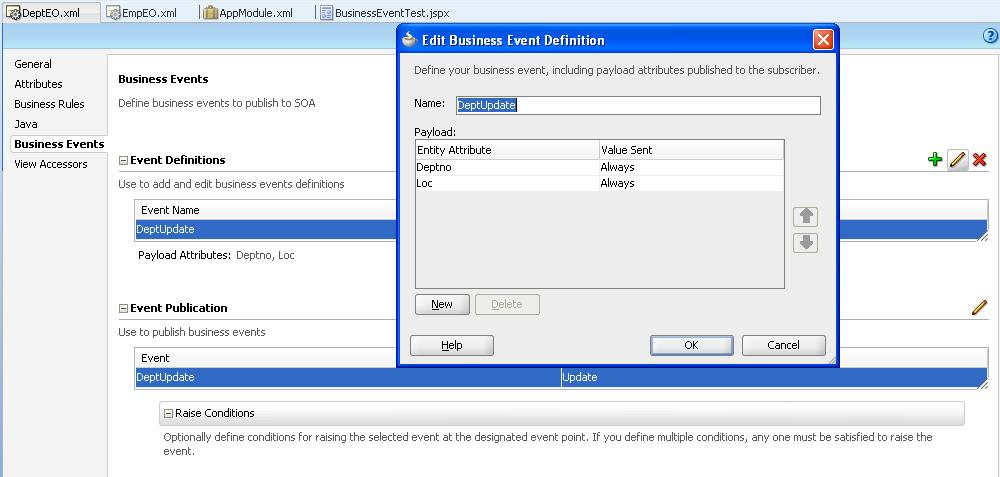
Defined and published a Department update event as shown below:


Defined a create event on Employee entity, and included Department attributes in the event definition, as shown below:


Here is how EmpEO looks like after the changes:


Then, created a new page, BusinessEventTest.jspx and dragged both Emp and Dept VOs to create tables, as shown below:


After running, the page looks like this:


Then, updated the location of first Department record, and created 2 new Employee records, as shown below:


After commit, ran the following query and figured out that business events are raised successfully:

SELECT * FROM AQ$EDN_EVENT_QUEUE_TABLE;

The above query returns 6 records, which means that 3 events are raised, 1 for Department update, and 2 other for each Employee record. To see the payload of each event without consuming the event in SOA composite, you can run the following query that returns 3 record (one for each event):

SELECT E.USER_DATA.EVENT.PAYLOAD FROM EDN_EVENT_QUEUE_TABLE E;

The above query is composed because of the following data model:

CREATE TABLE EDN_EVENT_QUEUE_TABLE (
  Q_NAME            VARCHAR2(30)   NULL,
  MSGID             RAW(16)        NOT NULL,
  CORRID            VARCHAR2(128)  NULL,
  PRIORITY          NUMBER         NULL,
  STATE             NUMBER         NULL,
  "DELAY"           TIMESTAMP(6)   NULL,
  EXPIRATION        NUMBER         NULL,
  TIME_MANAGER_INFO TIMESTAMP(6)   NULL,
  LOCAL_ORDER_NO    NUMBER         NULL,
  CHAIN_NO          NUMBER         NULL,
  CSCN              NUMBER         NULL,
  DSCN              NUMBER         NULL,
  ENQ_TIME          TIMESTAMP(6)   NULL,
  ENQ_UID           VARCHAR2(30)   NULL,
  ENQ_TID           VARCHAR2(30)   NULL,
  DEQ_TIME          TIMESTAMP(6)   NULL,
  DEQ_UID           VARCHAR2(30)   NULL,
  DEQ_TID           VARCHAR2(30)   NULL,
  RETRY_COUNT       NUMBER         NULL,
  EXCEPTION_QSCHEMA VARCHAR2(30)   NULL,
  EXCEPTION_QUEUE   VARCHAR2(30)   NULL,
  STEP_NO           NUMBER         NULL,
  RECIPIENT_KEY     NUMBER         NULL,
  DEQUEUE_MSGID     RAW(16)        NULL,
  SENDER_NAME       VARCHAR2(30)   NULL,
  SENDER_ADDRESS    VARCHAR2(1024) NULL,
  SENDER_PROTOCOL   NUMBER         NULL,
  USER_DATA         EDN_EVENT_DATA NULL,
  USER_PROP         ANYDATA        NULL
);

CREATE OR REPLACE TYPE EDN_EVENT_DATA AS OBJECT (
    EVENT EDN_BUSINESS_EVENT,
    PUBLISH_IMPL CHAR,
    SUBJECT_INFO VARCHAR2(256),
    TARGET VARCHAR2(1024)
);

CREATE OR REPLACE TYPE EDN_BUSINESS_EVENT AS OBJECT (
    NAMESPACE VARCHAR2(256),
    LOCAL_NAME VARCHAR2(80),
    PAYLOAD SYS.XMLTYPE,
    COMPRESSED_EVENT DECIMAL(10),
    DECOMP_METHOD VARCHAR2(64)
);

Here is how the Deparment payload looks like:


Here is how first Employee record's payload looks like:


Here is the payload of the second Employee record:


You can see that both the child record's payload contains the new value for the parent entity, as specified in the child entity event definition earlier.

That's all.

JDev Release 11.1.1.4

Thursday, August 25, 2011

Best Description By JDeveloper.

Wish JDev would have been so precise for all the errors it throws sometimes.
Check this dialog, it does not need any explanation:


Cheers.

Wednesday, August 24, 2011

Things To Remember While Working With XML Menu Model.

Notes taken from DEV Guide:

1. Each node in the page hierarchy can be a parent and a child node at the same time, and each item node in the page hierarchy corresponds to a page.
2. A group node allows you to retain a hierarchy without needing to create pages for nodes that are simply aggregates for their children nodes. In other words, you dont need to create pages for Group Nodes.
3. Difference between Group Node & Shared Node:
Group Node: Groups child components; the groupNode itself does no navigation. Child nodes node can be itemNode or another groupNode.
Shared Node: References another XMLMenuModel instance. A sharedNode element is not a true node; it does not perform navigation nor does it render anything on its own.

In other words, a shared node can point to a menu model that begins with a group node.
Here is an example:

Root (Level 0) Menu code:
<?xml version="1.0" encoding="windows-1252" ?>
<menu xmlns="http://myfaces.apache.org/trinidad/menu">
  <itemNode id="itemNode_Home" label="Home" action="adfMenu_Home" focusViewId="/Home">
    <sharedNode ref="#{level1_menu}"/>
    <!--<itemNode id="itemNode_PartList" label="label_PartList" action="adfMenu_PartList" focusViewId="/PartList"/>-->
  </itemNode>
  <itemNode id="itemNode_Logout" label="Logout" action="adfMenu_Logout" focusViewId="/Logout"/>
  <itemNode id="itemNode_Help" label="Help" action="adfMenu_Help" focusViewId="/Help"/>
</menu>

Level 1 Menu code:

<?xml version="1.0" encoding="windows-1252" ?>
<menu xmlns="http://myfaces.apache.org/trinidad/menu">
  <itemNode id="itemNode_Main" label="Main" action="adfMenu_Main" focusViewId="/Main"/>
  <itemNode id="itemNode_ContactInformation" label="ContactInformation" action="adfMenu_ContactInformation"
            focusViewId="/ContactInformation"/>
  <sharedNode ref="#{level2_menu}"/>
</menu>

Level 2 Menu Code:

<?xml version="1.0" encoding="windows-1252" ?>
<menu xmlns="http://myfaces.apache.org/trinidad/menu">
  <groupNode id="itemNode_PartList" label="PartList" idref="itemNode_Inprocess">
    <itemNode id="itemNode_Complete" label="Complete" action="adfMenu_Complete" focusViewId="/Complete"/>
    <itemNode id="itemNode_ImportFile" label="ImportFile" action="adfMenu_ImportFile" focusViewId="/ImportFile"/>
    <itemNode id="itemNode_Inprocess" label="Inprocess" action="adfMenu_Inprocess" focusViewId="/Inprocess"/>
  </groupNode>
</menu>

Inaddition, there is not page for PartList node.

4. The value attribute of all navigation panes in a page template should reference only a root menu model and not any menu models referenced through shared nodes.  For example, if you use a shared node in your main XMLMenuModel element, JDeveloper would have created managed bean configurations for the shared node and the root XMLMenuModel bean that consumes the shared model. The shared model managed bean is automatically incorporated into the root menu model managed bean as the menu tree is parsed at startup.

Thursday, August 18, 2011

ADF Integration With SOA 1 - Business Events.

While working with Business Events (BEs), I faced some issues. In this blog, I am documenting whatever I did to successfully raise BEs.
I have divided this blog into 3 sections:

  1. Setup Required for BEs.
  2. Code Development.
  3. Deployment and Running the application to raise BEs.
For this example, I have used two servers:
  1. JDev's Integrated WLS (IWLS) for ADF application that raises the BE.
  2. Standalone SOA Server - Separate server where SOA application ( that will consume the BE raised by ADF app ) will be deployed.
Both the server are using my local Oracle Database for EDN. So, same EDN is shared by both the servers.
Hence, you can deploy each application on separate servers.

Setup Required for BEs.

Download and install SOA extension on JDev so that IWLS will have the libraries required for BE. Specifically, 'oracle.soa.workflow.wc'. To download SOA extension, go to Help->Check For Updates:


Do not uncheck 'Oracle Fusion Middleware Products' & 'Official Oracle Extensions and Updates', and click Next.


Select SOA extension and click Finish. Since I have already done it, so my JDev is not showing that entry now so can't add that snapshot.

The SOA extension will take some time to download. Once that is done, start the server, and in the IWLS console, you will be able to see an entry for 'oracle.soa.workflow.wc' library in the Deployments page.


Without this library, while raising BEs, you will get the following error:

<Utils> <buildFacesMessage> ADF: Adding the following JSF error message: oracle/fabric/blocks/event/BusinessEventConnectionFactory
java.lang.NoClassDefFoundError: oracle/fabric/blocks/event/BusinessEventConnectionFactory
at oracle.jbo.server.EventInvocation.raiseEvent(EventInvocation.java:513)
at oracle.jbo.server.EntityImpl.raiseEvents(EntityImpl.java:7724)
at oracle.jbo.server.EntityImpl.afterCommit(EntityImpl.java:7329)
at oracle.jbo.server.DBTransactionImpl.doAfterCommit(DBTransactionImpl.java:2285)
at oracle.jbo.server.DBTransactionImpl.commitInternal(DBTransactionImpl.java:2176)
at oracle.jbo.server.DBTransactionImpl.commit(DBTransactionImpl.java:2369)
at oracle.adf.model.bc4j.DCJboDataControl.commitTransaction(DCJboDataControl.java:1608)
. . .
at weblogic.servlet.internal.WebAppServletContext.securedExecute(WebAppServletContext.java:2277)
at weblogic.servlet.internal.WebAppServletContext.execute(WebAppServletContext.java:2183)
at weblogic.servlet.internal.ServletRequestImpl.run(ServletRequestImpl.java:1454)
at weblogic.work.ExecuteThread.execute(ExecuteThread.java:207)
at weblogic.work.ExecuteThread.run(ExecuteThread.java:176)
Caused by: java.lang.ClassNotFoundException: oracle.fabric.blocks.event.BusinessEventConnectionFactory
at weblogic.utils.classloaders.GenericClassLoader.findLocalClass(GenericClassLoader.java:297)
at weblogic.utils.classloaders.GenericClassLoader.findClass(GenericClassLoader.java:270)
at java.lang.ClassLoader.loadClass(ClassLoader.java:307)
at java.lang.ClassLoader.loadClass(ClassLoader.java:248)
at weblogic.utils.classloaders.GenericClassLoader.loadClass(GenericClassLoader.java:179)
... 65 more

By installing SOA extenstion to JDev, we can use JDev's IWLS to raise events successfully.
Apart from this, you need to create the following two Data Sources(DSs) on IWLS:
  • EDNDataSource (XA DS )
  • EDNLocalTxDataSource (Non-XA DS)


If you don't define these DSs, you will get the following messages in JDev log while raising BEs:

INFO: Looking for BusinessEventConnectionFactory
INFO: Looking for EDN-DB JNDI configuration to create SAQRemoteBusinessEventConnectionFactory.
INFO: Unable to create SAQRemoteBusinessEventConnectionFactory: [jdbc/EDNSource or jdbc/EDNDataSource] undefined.
INFO: Looking for EDN-JMS JNDI configuration to gcreate JMSRemoteBusinessEventConnectionFactory.
INFO: Unable to create JMSRemoteBusinessEventConnectionFactory: [java:comp/UserTransaction] undefined.
INFO: Unable to create JMSRemoteBusinessEventConnectionFactory: [jms/fabric/EDNConnectionFactory] undefined.
INFO: Failed to get ConnectionFactory instance.
. . .
<JmsBusinessEventBusMessages> <warnUsingGlobalDatasourecForLocal> Local Tx Datasource not found, using XA datasource. Please update your configuration.

Once you define these DSs successfully, you wont get these messages in JDev log, and are required for successfully raising BEs.

EDNSource is not required if you define EDNDataSource. Looks like ENDSource is an old name of the driver and the new name is EDNDataSource.

In my case, SOA Server is already having these DSs, so I just replicated those DSs on IWLS.
For more details about DSs, please refer to the following forum post:

Code Development.

I have created a small application over SCOTT.EMP table to raise a BE on employee creation.


EmpEO is based on SCOTT.EMP, and added to AppModule through EmpVO. Using the Business Events section of EmpEO, I defined and published the following event:


The following is the event definition:


And here is now the event is published:


After that, I created a simple page for EmpVO, and added two buttons, one for row insertion, and second one for commit:


Then, in the weblogic-application.xml, visible in Descriptors->META-INF folder in Application Resources, I added the following entry:


This is done so that we can get access to 'oracle.fabric.blocks.event.BusinessEventConnectionFactory'.
If we straight away add 'SOA Runtime' or 'SOA Workflow' library to our model project, some how the class is not accessible, so getting this from the server itself.

Then created a small SOA application to subscribe to the event using Mediator, and writing the payload to a text file using a File Adapter:


The Mediator in the above figure points to the EmpEO.edl and EmpEO.xsd files of the previously created ADF application. The mediator passes the payload to BPEL:


And here is the transformation:


The following image shows the structure of BPEL, which transfers to payload to File Adapter:

And File Adapter writes the paylaod to a file in C:\TEMP folder:

Using the EmpEOs schema:

So, now lets run the application to raise BEs.

Deployment and Running the application to raise BEs.

Deploy the SOA application to the standalone SOA Server:


And run the ADF Application using CreateEmployee.jspx. Click 'CreateInsert' to insert a row in the table as shown below:

After entering the data, Click Commit. The BE is raised, and you can confirm by querying 'AQ$EDN_EVENT_QUEUE_TABLE' view:
If there is a consumer, like SOA app in our case, the records get vanished after a min or so, and SOA app writes the following paylaod to a text file as expected:

Done.

JDev Release 11.1.1.4